 BASSMAP
Guide
How to read a subwoofer frequency response
Updated
A subwoofer frequency response shows how loud each bass frequency is at one microphone position. Peaks are frequencies the room reinforces; nulls are frequencies that cancel. Peaks usually respond well to EQ cuts, while deep nulls usually do not respond to boost. Because bass changes a lot from one spot to the next, always compare several positions before drawing conclusions.
How do I read the graph?
The horizontal axis is frequency, usually on a logarithmic scale so each octave (20–40 Hz, 40–80 Hz, 80–160 Hz) takes the same width. The vertical axis is level in decibels. A 6 dB change is a doubling of sound pressure; around 10 dB is often described as sounding roughly twice as loud.
In a room, a subwoofer's curve is never flat. Expect variations of 10 dB or more in an untreated room; the question is which variations matter and which you can change.
What causes peaks?
Peaks usually line up with room modes: frequencies at which sound bouncing between surfaces reinforces itself. They often sound like boom or one-note bass, where certain notes ring longer and louder than others. A peak is a frequency where the room stores extra energy, so reducing the signal at that frequency with an EQ cut tends to reduce both the level and the ringing at most seats near it.
What causes nulls, and can EQ fix a deep null?
A null is a frequency where sound arriving by different paths cancels at the microphone, for example the direct sound and a reflection from a nearby wall, or a seat sitting on the pressure null of a mode. Boosting that frequency usually does very little: you add energy to both paths, and they keep cancelling. The amplifier and subwoofer work much harder for a small gain at that seat, and other seats where the frequency was fine get louder.
That asymmetry is why the usual advice is to cut peaks and fix nulls by moving the subwoofer, the seat, or both. Narrow dips are also generally less audible than peaks of the same size, a point discussed in Toole, "Sound Reproduction: The Acoustics and Psychoacoustics of Loudspeakers and Rooms". More on fixing nulls is in why bass disappears in some spots.
How much smoothing should I use?
Measurement software can smooth the curve by averaging neighbouring frequencies over a fraction of an octave. Smoothing changes what you see:
- 1/3-octave smoothing gives a readable overall trend, but it fills in narrow nulls and flattens sharp peaks. It can make a problem room look fine.
- 1/12-octave smoothing keeps most of the detail that matters for subwoofer setup and is a common middle ground.
- 1/24-octave or no smoothing shows narrow features at their true depth, which helps diagnose a null or set a precise EQ filter, but looks noisy.
Whatever you choose, compare curves with the same smoothing. Two curves smoothed differently cannot be compared fairly.
Why does the response change when I move one seat?
At bass frequencies the room's pressure pattern changes over distances of a fraction of a wavelength. At 80 Hz the wavelength is about 4.3 m (14 ft), so moving 0.5 m (1.6 ft) can move you from near a pressure maximum toward a null of one of the modes. That is why a single measurement position describes that position, not the room. The standing waves guide shows where the peaks and nulls of each mode fall.
If several people listen, measure each seat. If one listener moves their head, measure a few points around the main seat. The response you should optimize is the one that is reasonably consistent across those points.
Is my measurement repeatable?
Measure twice before trusting a result. Keep the microphone at the same position, height and orientation, keep the volume fixed, and avoid noise during the sweep. If two runs at the same spot differ by more than a decibel or two, look for causes such as background noise, a microphone that moved, or a device that changed its processing (night mode, dynamic EQ or room correction switching on). Only compare a before and an after measurement once you know the method itself is repeatable.
Relative vs calibrated levels
Many measurement tools show relative levels: the shape of the curve and the differences between positions are meaningful, but the absolute number is not a sound pressure level. Calibrated SPL needs a measurement microphone with a calibration file and a level reference, for example with Room EQ Wizard. For choosing a subwoofer position, relative levels are enough, because the question is which position gives a more even response, not how loud it is in absolute terms.
What a single measurement cannot tell you
- How the response at the seat next to it differs.
- Whether a null belongs to the seat or to the subwoofer position: you need to move one of them to find out.
- Which room mode or reflection causes a feature: a null at a given frequency does not identify a unique cause on its own.
- How the room's decay time, the ringing after a note stops, behaves, which a magnitude curve does not show.
Use the curve with the room
Compare peaks and nulls with your room dimensions using the room mode calculator, then test changes and measure again. A calculated mode is a prediction, not a measured result.Reading response across the room with BassMap
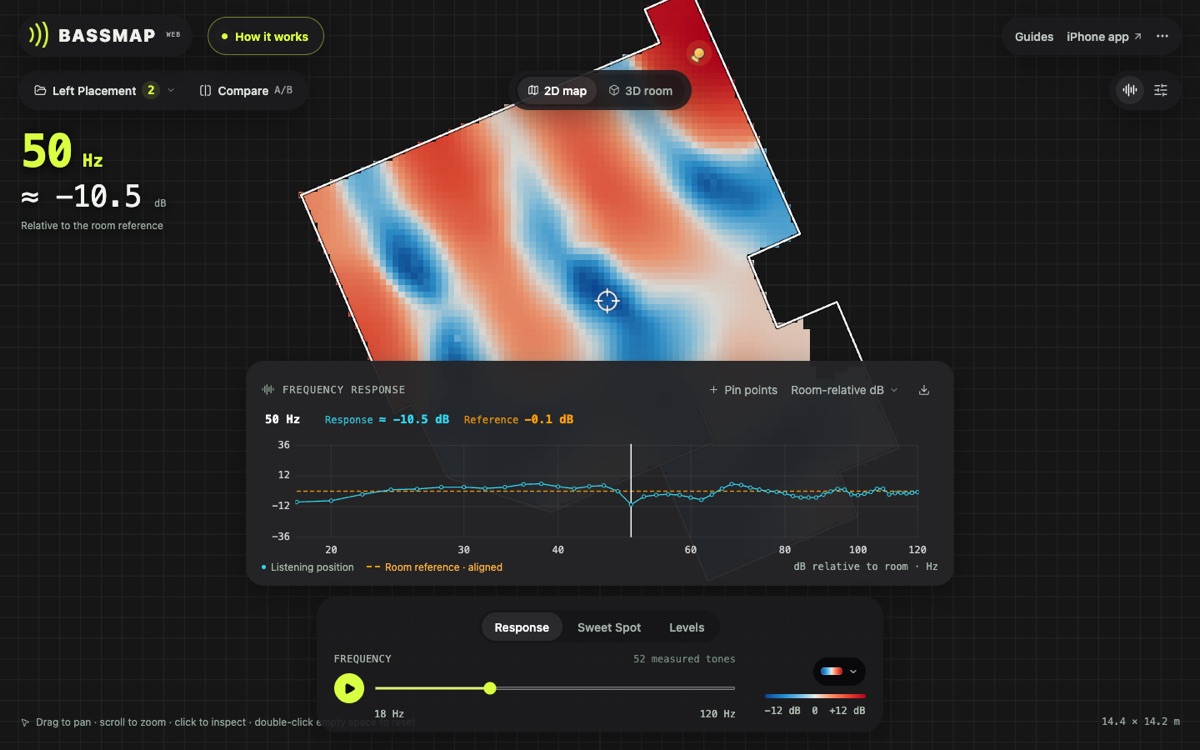
BassMap for iPhone measures many positions in one walk: while it plays a low-frequency test signal through your system, it records each tone's level with the phone's tracked position and draws a heatmap per frequency. You can open the frequency response at any measured spot, so you can check whether a dip is local to one seat or spread across the area. Levels are relative (room-relative dB or dBFS), not calibrated SPL.
For setup steps beyond reading the curve, see the subwoofer setup guide and the placement test loop in how to find the best subwoofer position.